

From Inbox to Pantry in Three Taps
If you read my recent post you'll know the Pantry app has taken over our kitchen, and the Ocado import was the star of the show. No more scanning every item, just upload the order PDF, check it over, and the whole shop is logged. Job done?
Well, almost. There was still one little bit of faff that had started to bug me. The Ocado receipt arrives by email on my iPhone, but to get it into the Pantry app I had to save the PDF somewhere, open the app, tap Ingest Ocado PDF, then go hunting through my files to find it. Not exactly hard work, but when you're stood in the kitchen surrounded by bags of shopping, it's the last thing you want to be doing!
What I really wanted was to open the receipt, tap Share, and send it straight to the pantry. That's how everything else on the iPhone works, so why not this?
Hold on a minute, what about the checking?
My first idea was simple, a shortcut that sends the PDF to the app and adds everything automatically. Then I stopped and thought about it. Ocado substitutions, the odd item that's gone straight in the bin, things you want in the freezer rather than the fridge, the review screen is there for a reason, and I didn't want to lose it.
So the idea was scrapped, and I went back to the drawing board. The new plan was for the shortcut to hand the receipt over to the Pantry app and then open the review screen for me, ready to check, tweak and confirm, just like before but without all the hunting around for files.
Now for the bit I was dreading
I'll be honest, I'm not a fan of Apple's Shortcuts app. I love what it can do, I just don't enjoy getting there, and with iOS 27 it's had a makeover, so even the bits I did know had moved! It now offers to build a shortcut for you if you just describe what you want, which sounds great, but I wanted to know exactly what was going in, so I skipped it and did it by hand.
It's only three steps in the end, send the PDF, pick out the link that comes back, and open it in Safari. Of course it didn't go perfectly. Shortcuts crashed the first time I tried to add one of the steps, and when I finally tested it, it failed with an error that had me scratching my head. The cause? A typo in the web address. All my own work 🤦🏻♂️
So how does it work?
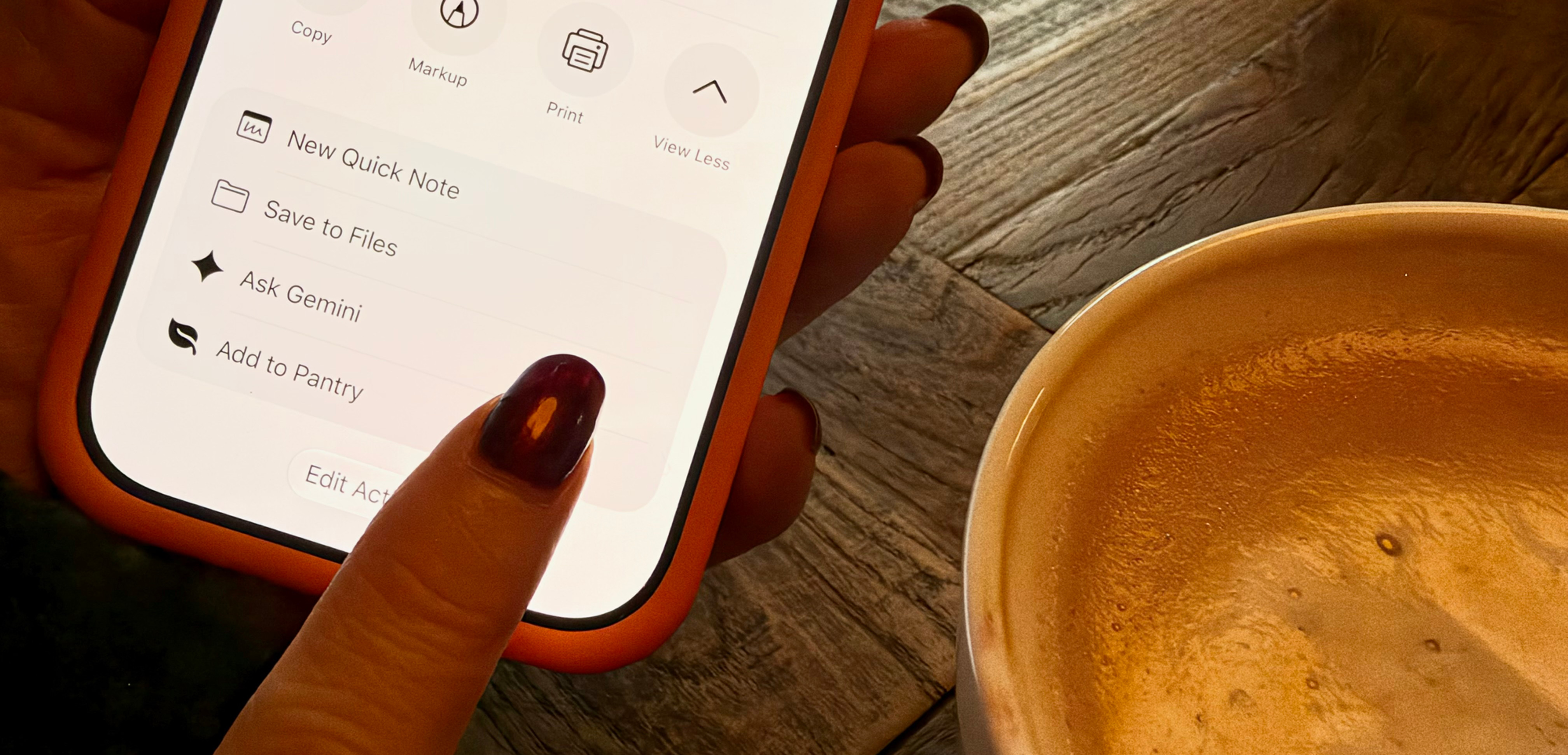
When the email from Ocado lands, I open the PDF, tap Share and pick Add to Pantry. A second or two later Safari opens on the Review Ocado Order screen with the whole delivery listed, fridge, freezer, pantry and snack drawer all sorted. I untick anything I don't want, adjust anything that needs adjusting, tap Confirm & Add to Inventory, and that's it.
From inbox to pantry in three taps, and I didn't even have to put the shopping down.
And the finishing touch? Shortcuts won't let you use your own picture as the icon, but an orange background with a leaf is close enough to the Pantry app icon that I spot it straight away in the share sheet. It's the little things!
Tech Details
For those who like to see what's going on under the bonnet, here's what changed. As before, everything runs at home on our Synology NAS, there's no third party service involved, and the receipt never leaves the house.
A new "share" door into the app: the server gained a new address just for the shortcut. It accepts the Ocado PDF, either as the raw file or as a form upload, and reads it with the same Ocado parser the website already uses
Nothing is saved straight away: the items read from the PDF are held in the server's memory as a pending import with its own unique ID, and nothing goes into the inventory until it's been reviewed and confirmed
Tidying up after itself: a pending import is cleared as soon as it's confirmed, and anything left unconfirmed is thrown away after 24 hours, or when the container restarts
The link back: the server replies with a small bit of JSON (JavaScript Object Notation) that includes a link to the app with the import ID on the end, and that's the link the shortcut opens in Safari
The review screen: when the app opens with an import ID in the address, it fetches that pending import, attaches photos for products it already knows, and opens the normal review screen. The ID is then removed from the address bar, so a refresh doesn't bring the same delivery back
The shortcut itself: three actions, Get Contents of URL (POST, with the shared PDF as the request body), Get Dictionary Value (to pick out the link) and Open URLs. It only appears in the share sheet for PDFs, and it currently talks to the NAS over the home Wi-Fi, which is where the delivery arrives anyway
Testing: the app has a set of automated tests, two new ones cover the share flow, and all 12 pass. It was also tested end to end in a browser before going anywhere near the NAS
Deploying it: the two updated files went up to the NAS in File Station, then in Container Manager the old container and its image had to be deleted before rebuilding, otherwise the NAS happily carries on running the old version. Yes, I forgot that step again, so this time it's written down!
If you've got a little job at home that's more effort than it should be, or you'd like something like the Pantry app set up for your own kitchen, it's exactly the kind of project we love, so get in touch.


Comments